


POV – Disposable Camera Events
4.8106.00 Reviews
App Specs
- Version
- 1.55.1
- Updated On
- License
- Free
- Downloads
- 1,000,000+
- Developer
- Untitled Tech, Inc.
- Categories
- Events
- Platform
- Android, iOS
Screenshots
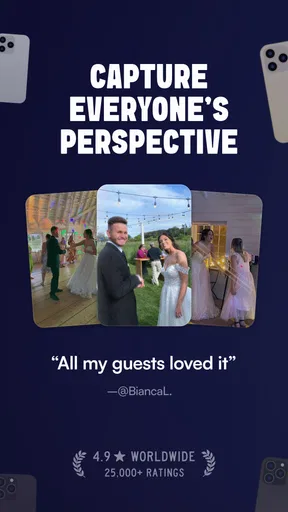
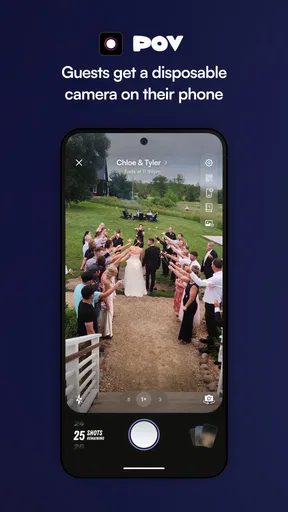
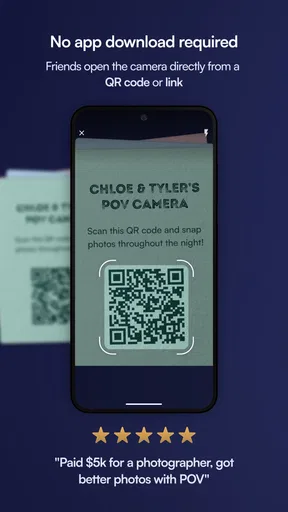
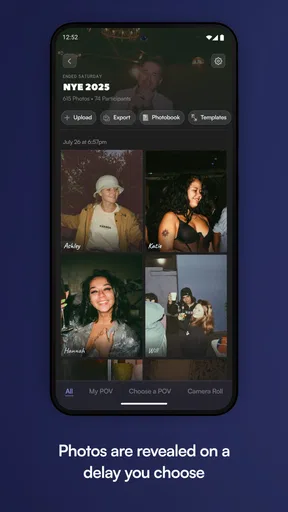
 Analysis by AppCompare
My first piece of advice for trying POV – Disposable Camera Events is to think of it less as a camera for getting the perfect shot and more as a way to give a gathering its own shared photo ritual. That distinction matters: the app’s delayed reveal is part of the point, so it suits people who enjoy anticipation and a group album more than instant checking and editing.
What to expect from the camera experience
This is an events app from Untitled Tech, Inc., built around the feel of a disposable camera rather than a conventional camera roll. Its appeal is the change in habit: take a photo, put your phone away, and let the moment continue without immediately reviewing every frame. If you usually take several versions of the same shot and choose the best one on the spot, the delayed feedback may feel restrictive at first. If you like the idea of seeing a gathering through everyone’s imperfect snapshots later, it can make the experience more engaging.
The app is free to install, and it has a 4.6 average from around 5,000 ratings. It has passed half a million installs, which suggests this format has found an audience beyond people simply looking for a novelty filter. The Teen age rating is also worth keeping in mind when choosing an app for a family event; it is not a substitute for checking whether it suits every guest or the way you plan to share photos.
Start with a small, low-pressure test
Before relying on it for a wedding or a once-only celebration, I’d try the basic flow at a casual get-together. Install the app on a device running Android 6.0 or later, open it, and get comfortable with the camera before the event begins. The current version is 1.44.170. Rather than waiting until the room is busy, take a moment to understand where the camera controls are and how the event setup works. A little rehearsal helps avoid turning your first real use into tech support for your friends.
For your first event, choose a familiar group and explain the delayed-photo idea before inviting people to contribute. That small bit of context prevents the natural question of why a just-taken picture is not immediately available. Ask guests to capture moments they might otherwise miss while posing: people arriving, a joke at the table, or the quieter conversations between the big moments. The result is more likely to feel like a record of the gathering than a row of formal group shots.
Make the first shared album feel worthwhile
A useful first success is not simply creating an event; it is giving people a clear reason to take part. For a birthday dinner, I’d set up the event before guests arrive, then mention it once everyone is settled. Invite a few people who are comfortable trying new apps, and let them show the rest of the group how they’re using it. That is usually easier than asking every guest to download something while they are walking in or trying to greet one another.
Keep the request simple: use the camera for candid details, not every single thing in sight. A few different viewpoints can make a shared collection more interesting than dozens of near-identical pictures of the cake. This is a practical trade-off with a communal camera format: participation adds perspective, but the album reflects what contributors choose to notice. If a particular moment matters to you, take a conventional photo separately rather than assuming the group will capture it.
Worth Reading Before You Choose

Switching to Android Auto Means Rethinking Your Driving Routine

Google Calendar Makes a Crowded Week Easier to Manage

Baby Panda World Brings Quick Play to Modern Phones, but Its Game Library Feels Busy

ESPN’s Live Game View Makes Following Close Games Easier

QuizzLand Review: A Good Fit for Short Trivia Breaks, Not Every Player

Basketball Stars: Multiplayer Is Fast, but Can It Recover When Matches Go Wrong?
Bringing Back the Retro Charm
Remember those old-school disposable cameras? The ones you had to wait to develop before you could see how your shots turned out? Well, POV – Disposable Camera Events captures that essence perfectly. The app emulates the unpredictability and charm of those classic cameras. When you open the app, you're greeted with a simple, no-fuss interface that instantly transports you back to the 90s.
The idea is straightforward: you take a picture, and just like the good ol’ days, you don’t get to see it right away. Instead, the app holds onto your photos, developing them overnight. It’s like a little surprise waiting for you every morning, and honestly, it’s kind of exciting. The anticipation adds a sprinkle of magic to the mundane act of snapping photos.
User Experience
Using the app is a breeze. With its minimalistic design, it’s pretty intuitive. You won't find a bunch of clutter or confusing buttons. Just point, shoot, and wait. And let's face it, the waiting part is a big chunk of the fun. You can't help but feel a bit of nostalgia as you anticipate which moments you've captured.
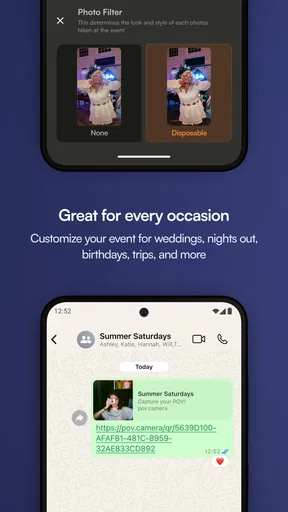
The app also lets you create events, which is a neat feature. You can set up an event, invite friends, and everyone can contribute to a shared album. It’s perfect for birthdays, weddings, or any gathering where capturing memories is a must. It adds a communal feel to the experience, letting everyone relive the moments together once the photos are developed.
Choosing the right occasion—and the right backup
I think this works best when a group is already together and has a reason to share a collection: a birthday, a wedding reception, a holiday meal, or a reunion. It is less compelling for a solo photo walk, a work task that needs polished documentation, or a trip where you want to sort and post images as you go. For those situations, the regular camera app is more direct and gives you immediate control over selection and sharing.
For an important occasion, I would treat this as a companion to the phone’s normal camera, not a replacement. Use POV for spontaneous shared memories, then take ordinary photos of essentials such as a family portrait, a venue detail, or a moment you cannot repeat. That does not undermine the delayed reveal; it simply recognizes that a playful group album and a dependable personal record have different jobs.
There is also a social trade-off to think about. An event album can make it easier for guests to contribute from their own perspective, but the group format means you are not the only person shaping the result. If you want a tightly curated set, or if the people involved would rather not install an app, this may not be the right approach. A shared folder or one person taking pictures may be simpler for that group.
A few practical choices that improve the result
One useful habit is to tell guests what kind of pictures you hope to remember, without assigning them a checklist. For a wedding, that might mean candid moments during the reception rather than asking everyone to photograph the ceremony. For a dinner, it might be the people and small details around the table. This gives contributors a gentle prompt while keeping the photos spontaneous.
Another is to avoid making the app the only place where a must-have shot can exist. The delayed development is enjoyable precisely because it removes immediate review, but that same delay means it is not ideal when you need to confirm a photo right away. If you are documenting something for practical reasons, or a guest needs a picture immediately, use the normal camera instead. Choose the camera to match the moment, rather than expecting one style to cover every need.
It is also worth considering the group before you send invitations. Some friends will happily join in; others may not want another app on their phone or may prefer not to contribute photos. The event works best when participation feels optional and relaxed. I would not make the shared camera a requirement for attending, especially at a gathering where guests have different comfort levels with apps and photo sharing.
Aesthetic and Quality
The images have a charmingly grainy quality, reminiscent of vintage photographs. The filters applied to the photos enhance this effect, making your digital shots look like something straight out of a family photo album from decades ago. It’s a refreshing break from the hyper-realistic, pixel-perfect images we’re so used to seeing these days.
However, this isn’t an app for someone looking for crystal-clear photography. If HD quality is your thing, you might find the app’s aesthetic a bit off-putting. But if you’re in it for the vibe and the nostalgia, then you’re in the right place.
How it compares with ordinary camera apps
The main difference from a phone’s built-in camera is not just the look of the pictures; it is the delayed viewing and event-centered way of collecting them. A normal camera is better when you need immediate confirmation, careful framing, or a quick share. A conventional shared album is more useful when everyone wants to review and organize images straight away. POV gives up some of that immediacy in exchange for suspense and a communal reveal.
That makes it a poor fit for people who rely on their camera for work, need to check focus and exposure after each shot, or want to edit images before anyone else sees them. It is also not the best match for someone who dislikes waiting or wants full control over a final album. I would choose it for the mood of an event, not as my main photography tool.
There are optional in-app purchases, priced from $4.99 to $89.99 per item, so it is sensible to check the purchase screen before committing to anything beyond the free starting point. You do not need to buy into the idea before deciding whether delayed pictures and shared events suit your group. Trying it casually first is a better test than making a paid choice based only on the retro look.
Why You Might Love It
If you’re a fan of that throwback feel, POV – Disposable Camera Events will likely be your cup of tea. It’s not just an app; it’s an experience. It makes you pause and appreciate the moments rather than mindlessly snapping a thousand photos that you’ll never look at again. Plus, the shared events feature adds a fun, social element to the whole process.
For those who love a bit of suspense and surprise, this app is a winner. There’s something delightful about not knowing exactly what you’ve captured until the next day. It’s like opening a gift you wrapped for yourself. Every picture tells a story, and the app ensures that you cherish those stories a little more.
What to do if the first event feels quiet
If only a few people contribute at first, I would not treat that as a failed test. The format asks guests to behave differently from how they do with a regular camera, and some may need a nudge before it feels natural. Show them the event camera, suggest one candid moment, then let the conversation take over. Repeated reminders can make a relaxed gathering feel like a photo assignment.
If the delayed reveal is the part your group enjoys, you can use that experience to decide whether to bring it to a larger occasion. If people would rather see each shot immediately, that is useful feedback too: use a regular camera or a shared album next time. The best setup is the one that fits the guests, not the one that asks everyone to adapt to an app.
Final Thoughts
Overall, POV – Disposable Camera Events is a delightful blend of modern technology and retro charm. It’s perfect for anyone looking to slow down and savor their memories instead of getting lost in the endless stream of digital photos. While it might not be for everyone, those who appreciate the art of anticipation and nostalgia will find it to be a real gem. So, go ahead, give it a shot, and take a stroll down memory lane. You might just find that the journey is as rewarding as the destination.
My recommendation is to start small, make the purpose of the event clear, and keep a regular camera available for anything that needs an immediate or reliable record. That gives the app room to do what it does best: turn a set of ordinary snapshots into a shared reveal. If your friends enjoy the wait and the looser, grainy look, it can become a memorable part of the gathering; if they do not, you can move on without having relied on it for the moments that mattered most.
Pros
- Authentic vintage photo effects.
- Simple and user-friendly interface.
- Quick sharing to social media.
- No need for post-editing.
- Lightweight and fast app.
Cons
- Limited editing features.
- Occasional in-app ads.
- Requires internet for features.
- No cloud backup option.
- Limited film options.
FAQs for POV – Disposable Camera Events
What features does the POV – Disposable Camera Events app offer?
POV – Disposable Camera Events replicates the nostalgic experience of using disposable cameras by allowing users to capture photos with a vintage aesthetic. The app offers features such as various filter options, a timer for group shots, and the ability to create photo albums for different events. Users can also share their photos directly to social media platforms.
Is POV – Disposable Camera Events free to use?
The app is free to download, but it offers in-app purchases for additional features and filters. These purchases can enhance user experience by providing more customization options and removing ads. Users can decide whether to stick with the free version or upgrade based on their preferences.
How user-friendly is the POV – Disposable Camera Events app?
The app is designed with simplicity in mind, making it easy for users of all ages to navigate. The interface is intuitive, with clear icons and straightforward instructions. Whether you're a seasoned photographer or a casual user, you'll find capturing and editing photos to be a seamless experience.
Can I use POV – Disposable Camera Events without an internet connection?
Yes, you can capture and edit photos without an internet connection. However, features such as sharing photos on social media or accessing certain filters may require connectivity. The app ensures that the core functionality is available offline, making it ideal for events where internet access might be limited.
What privacy measures does POV – Disposable Camera Events implement?
The app prioritizes user privacy by not collecting personal data without consent. Photos are stored locally on your device unless you choose to share them online. Users have full control over their data, and the app complies with privacy regulations to ensure a secure experience.


